Case Study with LiveLinks
I decided to write this MONSTER Pay Per Call guide where I give away EVERYTHING so you can CUT N PASTE + Bank!
That means, I am going to share with you my keyword research spreadsheet, my ad copies and all data - including the keywords that work best after data collection phase. YA READY?
No paradox here, just knowledge you can use RIGHT NOW to make $$$.
If you do PPC right and come in on a very creative angle of attack you can pull some really nice ROI.
The key to pay per call on adwords is to bid on keywords no one thought of, and have enough data so you aren't culling keywords prematurely.
Let's get down to business.
Before we get started, it is important to note that Due to the nature of PayPerCall campaigns and the fact you need to bid on a ton of keywords, and collect a ton of data I decided it'd be best to pick a low payout offer for this.
I ended up picking LiveLinks (it is available at F5 - CPA network recommended by STM), which is a chat line service / phone dating offer.
The payout is $1.6 and it pays out on 2 minutes, in region and during accepted hours.
With PPC offers its important to note a few things, they often restrict what region/city/geo they accept calls from, how long the calls have to be, and during what hours. So that means targeting by city level is needed in many offers, as well as time parting.
Offer Overview
Offer Name: LiveLinks
F5 Media - $1.60
Payout criteria : connect_duration > 2 min and during_hours and in_region
Accepted Hours:
Mon-Thu : 3:00 pm to 3:00 am
Fri-Sun : 3:00 am to 3:00 am
(all times Pacific)
Restrictions: No branded terms bidding
Step by Step - Table of Contents
Step #1 - Due dilligence
Step #2 - Coming up with the angles of attack
Step #3 - Generating the keywords
Step #4 - Getting the promo numbers
Step #5 - Designing the creatives (landers & text ads)
Step #6 - Setting it all up on adwords
Step #7 - Running data and observing
Step #8 - Analyzing data, and optimizing
Step #9 - Weekly Followup
BONUS: Exploring Advanced Adwords Ad Methods
Tools we will be using
- SpyFU.com - I bought the paid one, but you can make do with the free version too.
- SimilarSites.com
Step #1 - Due Diligence
Before anything else, I first want to make a list of similar chat services and look into how they advertise. Writing down their best ads/ad copy, and also their top paid and organic keywords. I save all of this in a spreadsheet to keep everything in one place. In fact, I recommend you create a spreadsheet for an offer and keep all the stuff in there, since you can just add as many tabs as you need within 1 document.
A) Find out who the competition is - using SimilarSites.com (operated by SimilarWeb)
- vibeline.com
- tangobyphone.com
- nightlinechat.com - top ads: http://i.imgur.com/XqmjVVd.png
- redhotdate.com
- lavenderline.net
- nightconnect.com
- mymobileline.com - top ads: http://i.imgur.com/wl6tAJQ.png
- talk121.com - top ads: http://i.imgur.com/DSJOKjz.png
B) Fire up spyfu.com and for all of the links above pull the top organic and top paid keywords, as well as their top 5 PPC ads. Save them in excel.
C) After we've done the work above, we will fire up excel or open office calc and create as many spreadsheets in the document as needed (in my case 8 was used) you should have 8 sheets like this:
 This will take a little work, we want to find what the highest volume keywords are, as they will play a big role in one of our angles of attack (talk about that more later).
here's what one (1) sheet looks like out of the 8
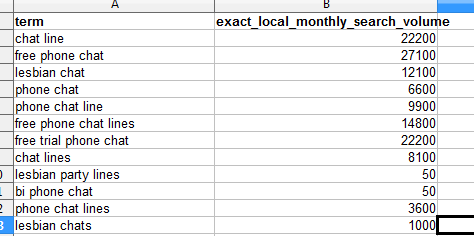
Next we want to click column B in each sheet and sort by descending.
After that, we have to copy the top 10 keywords from every single sheet and total searches into a new sheet side by side.

Step #2 - Coming up with the angles of attack
With Pay Per Call on adwords search, if you were to just target broad keywords chances are the cost per click would be way more than the payout, so even if you'd get 100% Conversion everytime you'd still be at a loss. That is why rather than thinking of an angle (simply a good headline) you must think of what I like to call angles of attack.
I threw some ideas around, some things that were flying in my head were.. if someone in new york wanted to chat on the phone what would they type in..
they'd type in some kind of keyword new york.. or nyc.. or big apple
so this is where angle of attack #1 came from - pair keywords with cities, mispellings of cities, acronyms of cities, and nicknames for cities
--moving on--
next idea... target names of competitors... good one, but won't work here since there's restrictions on the offer not to target brand names (NOTE: of course some rule defying affiliates will do this anyway thinking they won't get caught.. but I won't go there) -- so this idea is not applicable here..
idea 3 -- what about dating keywords? personals?? -- ding ding, yea thats another good one since many of these phone services are effectively there to meet new peeps and date..
idea 4 - sex chats, tons of horny dudes out there.. what do they type in when they wanna get kinky... sex chat, phone sex, etc..
so i ran through 4 ideas, out of which 3 are actionable... now depending on your budget testing all 3 might cost a fortune... since on idea alone i can probably generate 100,000 keywords to test and even if we'd run offer payout x1 before we'd cut anything that'd mean id have to spend $170,000 to test it fully...
so what did i decide to do, because I had $1000 test budget? 1) I will pick the best keywords, and long up long tails and create an ad group for all of these called general
phone sex phone dating line black chat line chat numbers chat line phone chat chat line number chat up lines for women phone chat line local chat line hot phone chat phone dating urban chat free trial phone chat adult phone chat chat line numbers
2) I will create a second ad group which will be called city and these will have the city name appended to my keywords from 1)
Step #3 - Generating the keywords
My angle of attack is to pair top keywords with names of cities, I googled (since google knows all) 'list of usa cities' and got a kick ass article on wikipedia -> http://en.wikipedia.org/wiki/List_of_United_States_cities_by_population
Using a table capture extension for chrome, I scraped the entire table and pasted it into a blank spreadsheet so I can take out the city names. After cleaning that stuff up (Had to remove [number] stuff, used regex in notepad++ to do it fast) I now had a list of the top 294 cities. Sweet.
Next I needed to combine my base keywords with these. From my due dilligence I know people either type in the city name before the keyword, or after the keyword - since I know adwords has a nifty feature called broad match modifiers its enough to just generate one of the two probabilities.
I had my coder create a tool so I can paste list of keywords, and it will automatically combine it with the list of cities - You can Access the Keyword Combiner Tool HERE
It produced a mega list of keywords, which i sorted by main keyword into different columns - here's a screenshot:
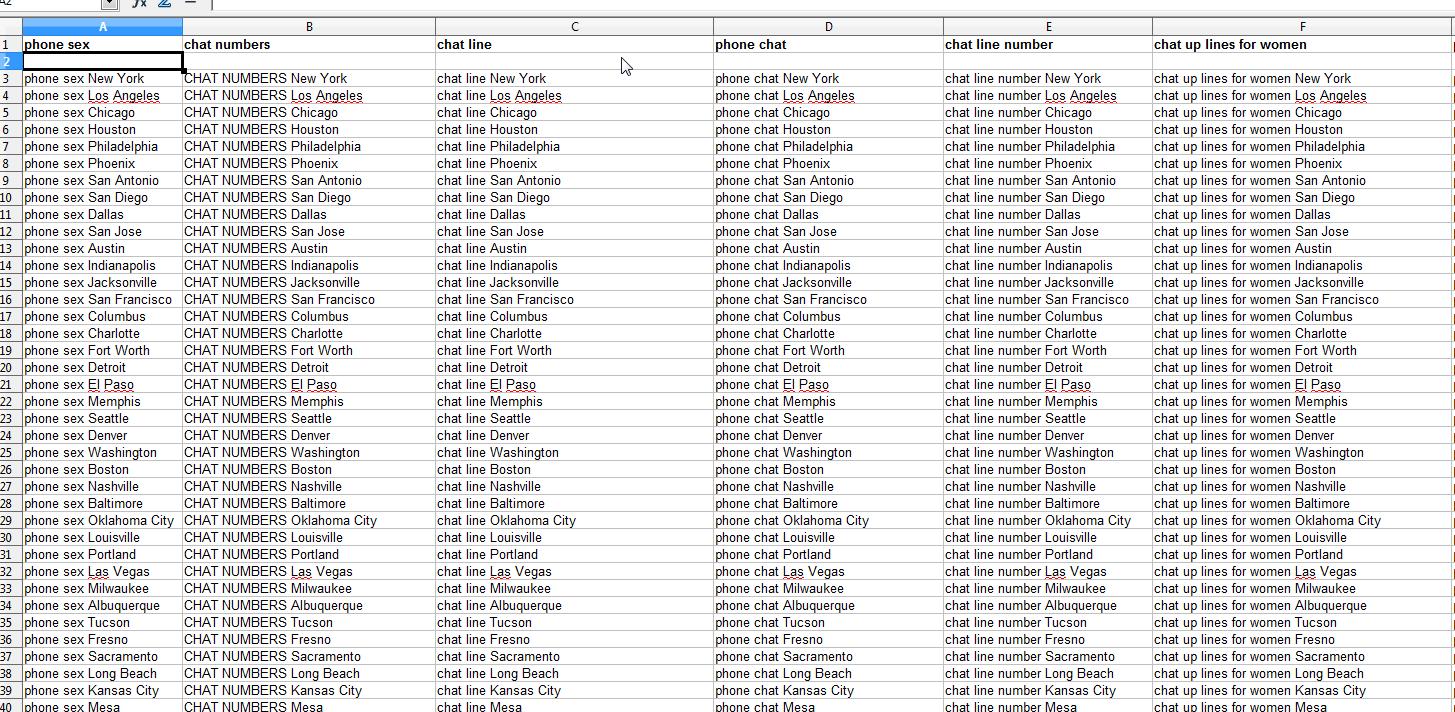
After I was done sorting them in my spreadsheet, I had to turn my list of keywords into broad match modifier style. That means a + before every single word.
What is broad match modifier? Click here to read up on it quickly at Google. http://www.google.co.uk/ads/innovations/bmm.html
I did this using notepad++ and regex, because I love using regex, but to make it as simple as possible so you can BANK HARD fast and not have to learn regex too, You can access the Broad Match Modifier Tool HERE which makes it easier.
http://tools.acquisio.com/AdwordsBroadKwConverter/
This is what it looks like AFTER I ran through my keywords in the tool:

Now we're getting somewhere!
Step #4 - Getting the promo numbers
I signed into F5Media via RingRevenue, found the LiveLinks offer, and then opened it up.
After doing so I clicked on PROMO NUMBERS from the gray tabs

and after clicked the Add Promo Number button, selected media type: Mobile:Search and put description: Livelinks + SAVE button to continue..
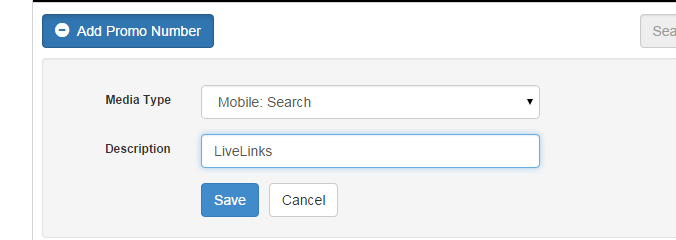 next I received my number, this is what I'll be using on adwords:

TIP: Call up the phone number, familiarize yourself with the prerecorded message, and what they say - sometimes you can get some ideas for ad copy from this, or give instruction in your ad copy so people that call know right away what to do after they call so you get your conversion.
Step #5 - Designing the creatives (landers & text ads)
Landing Page - In PPC you can link to a competitors page since we are using call extensions on mobile most people won't click through -or- you can make your own.
Since Google works on Quality Score, here's a tip. When you make your lander, make it really crappy, so the QS will be very low and you won't get much web traffic. We don't want any web traffic in fact, we want all of the traffic to come on our mobile call extensions.
I made a ultra crappy lander in adobe muse, you can check it out at www.localphonechat.net
for the lazy ones here's a screenshot

Step #6 - Setting it all up on adwords
NOTE: It is vital that you set it up correctly, or you will be wasting money.
GOLDEN TIP: Make your web page a really crappy site, that will get a low QS so people go to your mobile call extension direct
- Login to adwords.google.com
- Click on +Campaign and select Search Network ONLY

- Next we want to fill out the stuff to setup a payper call
Type in a campaign name, select search network only -> ALL Features (this is vital)

Under Networks, make sure you DECHECK Include Search Partners. We are doing this because we want traffic only from google search to ensure high HQ and proper targeting.
 Under Locations set the accepted GEOS, in the case of livelinks its entire USA so I simply put United States here

Extend the Locations Options (advanced) menu and make sure you select the following:

Next, we set the bid strategy - here select Focus on Clicks and set your default bid to 0.30 cents and budget to $50 for start.

Delivery method, make sure you select Accelerated here:

- Now that the campaign 'basics' are set, here comes the fun part. setting the ad extension - tap to call.
What is an ad extension? It enabled us to do some really cool thinks, like with PayPerCall the ability to click or TAP to call directly. So when someone on a mobile phone taps on your ad, they will right away auto dial the offer - this is what we need.
Simply select CALL - extend my ads with a phone number

A new menu will appear, here is where you paste your phone number that F5media gives you within their invoca front end. [#Jump to part #4 where you can read how to get the phone number]
Click on New Phone Number, then paste it in the field
Next to show my ad with: make sure A Google forwarding phone number and call reporting is selected
Below Show the following links: Just the phone number (hide the website address, again very important!)
Device preference: mobile (because you want to run on mobile devices only not computers)
Click ADVANCED, and where it says Report phone call conversions make sure you check Count call as phone call conversions.
Next click on the Manage conversions actions blue link, this will open a new window where you have to setup a conversion. What is conversion tracking? Well google uses custom phone numbers to track each key phrase separately and they can tell you which one converted. To set it properly we have to check how many minutes it takes for the offer to convert; in the case of livelinks it is 2 minutes so we always add +30 seconds to that - with that in mind, we setup a conversion tracking for 2.5 minutes.
To set it up click +Conversion, give it a name (ie 2.5 mins conv), select calls from ads using call extensions

Press save and continue then set it up according to your offer specifics (in my case, offer pays 1.6$/call and converts at 2 minutes, so I add 30 seconds to that so i set 150 seconds)

after you filled out everything as above, press save & continue, on the next screen click DONE.
Go back to your original campaign (it is most likely one tab back in your browser)
Now from where it says Report phone conversions - Count calls as phone conversions, conversion action DROPDOWN select the 2.5 minutes conversion tracking you just setup.
It should look like this:

Click SAVE
Now on the screen click the phone number you just added to add it to the right side.
Scroll down and set the time parting, this is important as livelinks only takes calls from 3AM-3PM PST (Pacific Standard Time)
TIP: If you are NOT in the PST timezone, use this tool to quickly convert your time to PST time.
http://www.worldtimebuddy.com/pst-to-cet-converter
After you've set that, click Save and Continue on the bottom.
Now it's time to setup the ad groups and the ads, and add the keywords. Ya ready?
A) Make sure Text ad is selected B) Type in your headline, description, description line2, display URL, and destination URL. C) Here are the ads I ran.
Here is add #1
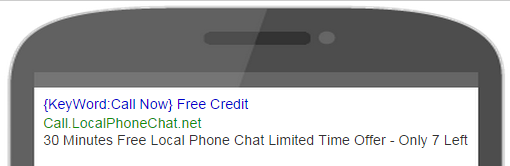
I was going for the scaracity factor here, and the fact that people when searching for phone chat lines always seem to be localized, that's a big thing with pay per call campaigns. Plus I am mentioning the facts from the offer, that they get 30 minutes free credits. The idea behind this is many people will call thinking oh hey I get 30 minutes free credit, but once they get into a conversation with some sexy sounding woman, they won't just say OH SHIT, my 30 minutes are up! GOTTA GO BYE! Hence, conversions
Here is add #2
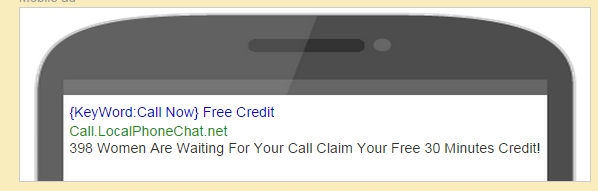
This one is trying to make it sound as if xxx women are waiting just for the reader to call. And they can do it EASY, for FREE since there's 30 minutes credit.
Now something important to note.
I was able to grab the domain LocalPhoneChat.net - which is pretty kick ass I must say. You can do cool stuff like make your display URL anything, ie: CallHotties.LocalPhoneChat.net if you wanted, I opted for Call.LocalPhoneChat.net The actual link MUST be valid though, and you cannot put one link ie Call.HotBabesAreStandingBy.Com and have your actual URL be www.livelinks.com - because then they will disapprove you for INCORRECT DISPLAY URL.
So you can COPY these word for word, or make your own.
D) After you typed in the ad, scroll down to the KEYWORDS section. This is where I add the first set of keywords from my spreadsheet - phone sex keywords
Repeat the above steps and create an ad group for each keyword and add in the keyword local variations within the ad group.
After you finish you will be taken back to the keywords pane, many will say below first page, etc for now we want to ignore that.
Next we're going to set our mobile bid adjustment for the campaign, to ensure we only get traffic from MOBILE and nothing else.
Click All online campaigns up top, then click the campaign you just created
Under settings click on Set mobile bid adjustment

Next click next to mobile devices with full browsers

A popup will appear, in it make sure you set increase by 300% and click SAVE

WHY do we have to do this? To get traffic from mobile phones and not from the web. Since click costs are sky high on the web, we're setting a bid adjustment to laser focus on mobile exclusively. Yea some web will trickle in, but most of what the Google algo will serve us is mobile phones with full browsers - exactly what we want.
Now we're set, our campaign is live.
Step #7 - Running data and observing
It will take a while for the campaign and ads to get approved by the Google team, after it goes live depending on the keywords it might spend your budget super fast like it did for me when I did this case study.
While the data runs, you can monitor it and see if anything drastically jumps out as a bad keywords (if it spends offer payout x2 and has 0 conversions stop it) but let the data run fully for a day or two this is very very important.
Step #8 - Analyzing data, and optimizing
After about a day or two, I looked at the numbers and with full transparency here is what they showed
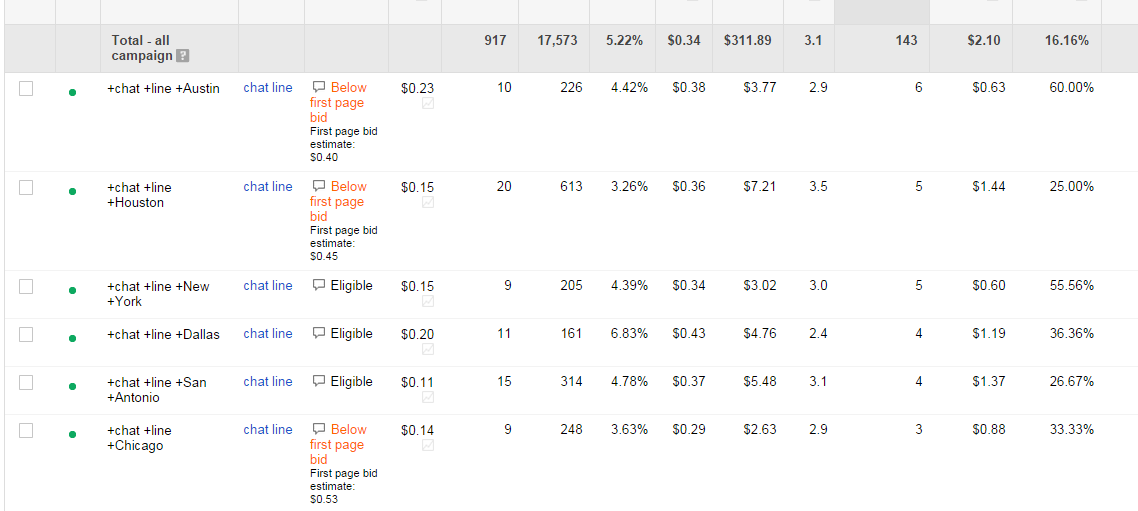
chat line austin was really good, it was costing me 38 cents average CPC and got me 6 calls!! Cost of converted click was 0.63 cents, meaning I was making more than 100% Roi on this keyword.
chat line houston on the other hand, wasn't that grand - the converted cost was 1.44$ making me only 16 cents profit which is like 10% ROI
chat line new york was awesome, 60 cents cost per lead and making me $1 pure profit!!
Tips for optimizing
-Cut keywords that are offer payout x2 or more and 0 conversions or more than 40% in the red, negative ROI.
-Increase bids where the conversion rate is high, and the cost / converted click is low - because you want more volume, this keyword is rocking!
-Keywords that didn't spend much or came close to the offer payout, increase the bids by 20% and watch them. The goal is to equally measure the potential of each keyword.
-Run 2 ads always at first, and see which one does better - then when you have data, make more ads based on the ad that was doing better fine tuning the add, making it sound more appealing. Finch's post about SINS right here can go along way with this offer, since people calling phone chat lines want lust, desire, fun, etc.
Step #9 - WEEKLY FOLLOW UP
Part 1) Call the offer every week by making a test call and listen to it, record it - you want to make sure they don't change anything you don't know about.
Part 2) Check if the keywords that were doing good last week are still killing it
Part 3) Check your ads, see how their CTR compares to last week, maybe ad blindness set in? Refresh it with something exciting - maybe throw in some current events to make it sound more 'real'
BONUS: Exploring Advanced Adwords Ad Methods
Here's one - Adwords allows scripting in these ads, so you can do fun stuff like have a real counter counting back how many more free 30 min creds are available. I won't get into it, but if you do a google search you can find an answer how to do that That can significantly boost your CR. It is not for newbies though, more advanced stuff for sure.